How to Architect an AI Product Before You Start Building
Building an AI feature is straightforward. Building an AI-powered SaaS that is reliable, cost-efficient, and maintainable at scale is a different engineering problem. The difference is not the AI — it is the infrastructure surrounding it. This post covers the architectural decisions that determine whether your AI-powered SaaS survives contact with real production traffic.
The Unique Challenges of AI in Production SaaS
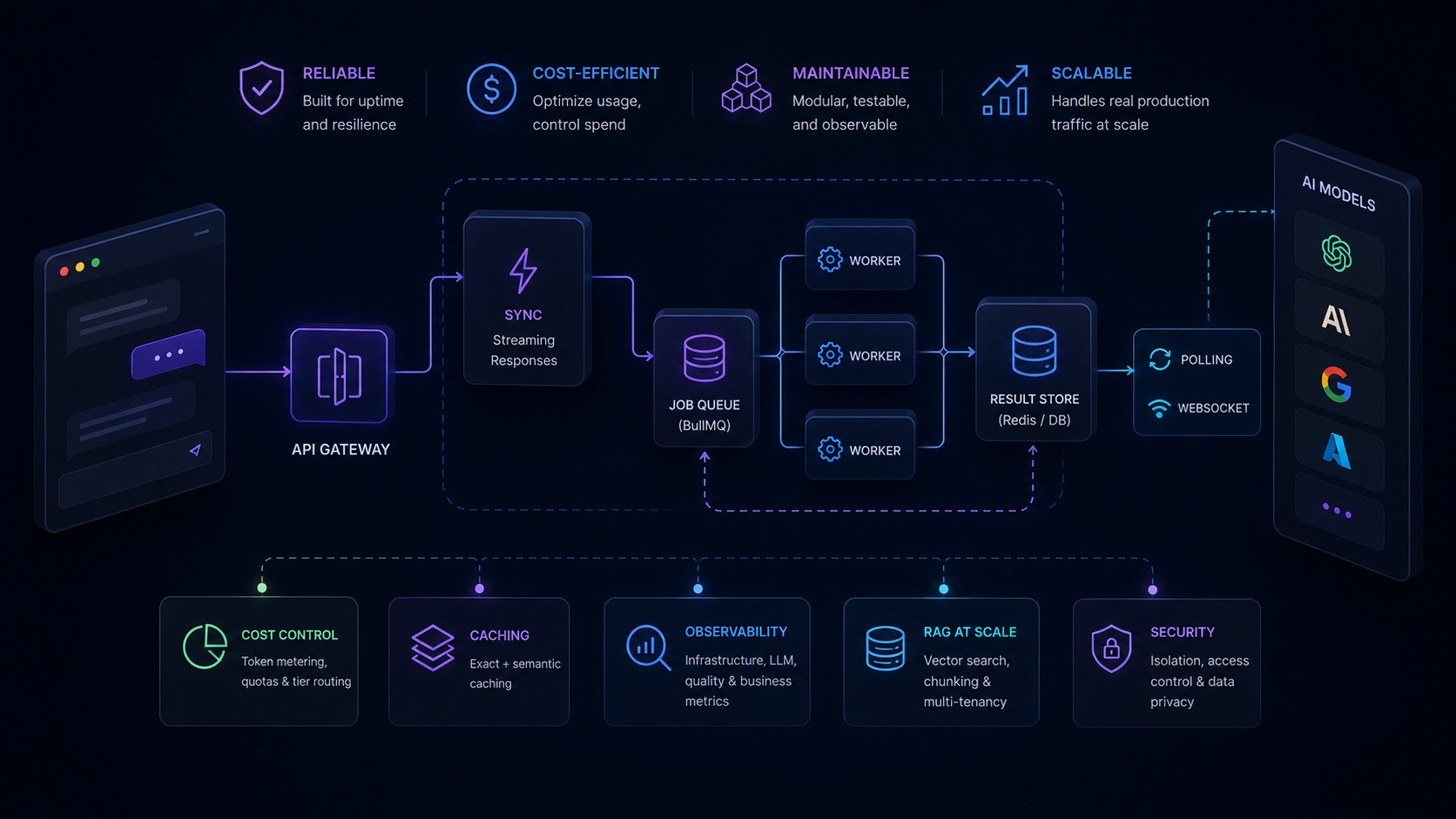
Traditional SaaS request handling is predictable: a request comes in, you query a database, you return a response. Latency is measured in milliseconds and cost per request is fractions of a cent.
AI-powered SaaS breaks both assumptions. A single LLM call can take 3–30 seconds and cost $0.01–$0.50 depending on model and token volume. This creates three problems that do not exist in conventional SaaS:
Latency unpredictability. LLM response times vary with model load, prompt length, and output length. HTTP timeout defaults that work fine for database queries will terminate AI calls mid-generation.
Variable cost per request. Token usage scales with prompt complexity and output length. A user who submits long documents pays more per operation than a user submitting short queries — but your pricing may not reflect this.
Provider dependency. LLM APIs have rate limits, quota constraints, and occasional outages. A single-provider dependency creates a single point of failure for your core feature.
Good AI SaaS architecture addresses all three before they surface as production incidents.
Sync vs Async: Choosing the Right Pattern
The most foundational decision in AI SaaS design is whether to handle AI requests synchronously or asynchronously.
Synchronous works when:
- Output is needed immediately for a user-facing interaction (chat completions, autocomplete, inline classification)
- Generation time is reliably under 5 seconds
- Real-time streaming is acceptable as an intermediate state
Asynchronous works when:
- Generation takes longer than 5–10 seconds (document analysis, long-form generation, multi-step pipelines)
- Tasks can be batched for cost reduction
- Output feeds a downstream process rather than appearing directly in the UI
Most production AI SaaS uses both patterns. The architecture that handles this cleanly looks like:
Client → API Gateway → Router
                           │
                    ┌──────┴──────┐
                    ↓             ↓
               Sync handler   Job queue (BullMQ)
               (streaming)        │
                              Workers (LLM calls)
                                  │
                              Result store (Redis / DB)
                                  │
                              Client polling / WebSocket
The job queue pattern is particularly important. It decouples HTTP responses from AI processing, allows horizontal scaling by adding workers, and provides natural retry handling when an LLM call fails.
Building the Queue Layer with BullMQ
import { Queue, Worker } from 'bullmq';
import { redis } from './redis.js';

const aiQueue = new Queue('ai-jobs', { connection: redis });

// Enqueue — returns immediately
export async function enqueueAiJob(userId, prompt, jobType) {
  const job = await aiQueue.add(jobType, { userId, prompt }, {
    attempts: 3,
    backoff: { type: 'exponential', delay: 2000 },
  });
  return job.id;
}

// Worker — processes asynchronously
const worker = new Worker('ai-jobs', async (job) => {
  const { userId, prompt, jobType } = job.data;

  const result = await callLLM(prompt);

  await db.aiResults.create({
    jobId: job.id,
    userId,
    jobType,
    result,
    completedAt: new Date(),
  });
}, { connection: redis, concurrency: 5 });
The concurrency: 5 limit is deliberate — it prevents a single worker from overwhelming your LLM API quota. Tune this based on your provider rate limits. Job IDs returned to clients should be UUIDs rather than auto-increment integers — they appear in API responses and logs, and sequential IDs reveal internal queue state to callers. UUID v4 in JavaScript: when to use one covers the v4 vs v7 tradeoff for IDs that need to be both unguessable and database-efficient.
Provider Abstraction and Fallback Routing
Hardcoding provider SDKs directly into business logic creates a brittle architecture. When you need to add a fallback, change models, or A/B test providers, you have to change every call site.
Build a provider abstraction layer instead:
class LLMClient {
  constructor(providers) {
    this.providers = providers; // ordered by preference
  }

  async generate(prompt, options = {}) {
    for (const provider of this.providers) {
      try {
        return await provider.generate(prompt, options);
      } catch (err) {
        if (err.status === 429 || err.status >= 500) {
          console.warn(`Provider ${provider.name} failed, trying next`);
          continue;
        }
        throw err; // Non-retriable error — don't try the next provider
      }
    }
    throw new Error('All providers exhausted');
  }
}

const client = new LLMClient([
  new VertexAIProvider({ model: 'gemini-1.5-pro' }),
  new OpenAIProvider({ model: 'gpt-4o' }),
]);
This pattern lets you add providers, change routing logic, or implement model routing (cheaper model for simple tasks, powerful model for complex ones) without touching business logic. For a detailed comparison of when to use each provider, see OpenAI vs Vertex AI for production SaaS.
Cost Control in Multi-Tenant Systems
In a multi-tenant SaaS, one heavy user can generate costs that affect your margins across all tenants. Cost control requires metering at the call level:
async function trackedLLMCall(userId, tenantId, prompt, model) {
  const start = Date.now();
  const result = await llmClient.generate(prompt, { model });
  const latencyMs = Date.now() - start;

  // Record usage for billing and limits
  await metering.record({
    userId,
    tenantId,
    model,
    promptTokens: result.usage.promptTokens,
    completionTokens: result.usage.completionTokens,
    costUsd: calculateCost(model, result.usage),
    latencyMs,
    timestamp: new Date(),
  });

  return result;
}
With per-request metering in place, you can implement:
- Soft limits — warn users at 80% of their monthly quota
- Hard limits — reject API calls when quota is exhausted
- Tier routing — route free-tier users to cheaper models automatically
- Billing — aggregate monthly token usage for invoicing
The cost calculation per model is straightforward once you know your provider's pricing. Cache the pricing table rather than hitting an API for every calculation.
Caching LLM Responses
LLM calls are the most expensive operation in your stack — caching them correctly has an outsized ROI.
Exact caching with Redis:
import { createHash } from 'crypto';

async function cachedGenerate(prompt, options = {}) {
  const cacheKey = `llm:${createHash('sha256').update(JSON.stringify({ prompt, options })).digest('hex')}`;

  const cached = await redis.get(cacheKey);
  if (cached) return JSON.parse(cached);

  const result = await llmClient.generate(prompt, options);

  // Cache for 1 hour — adjust TTL based on how dynamic the content is
  await redis.setex(cacheKey, 3600, JSON.stringify(result));

  return result;
}
Semantic caching for near-duplicate prompts uses vector similarity to find cached responses for prompts that are semantically equivalent but worded differently. This is more complex to implement but reduces cache miss rates significantly for user-facing features where natural language variation is common.
For a deep dive on caching strategies and cost reduction, see how to reduce LLM API costs in production.
Observability: Knowing When Things Break
AI pipelines fail in ways conventional apps don't. The response arrives, the status code is 200, but the output is subtly wrong. Standard HTTP monitoring misses this entirely.
You need monitoring at four levels for an AI-powered SaaS:
| Level | What to measure | Alert threshold |
|---|---|---|
| Infrastructure | Error rate, queue depth, worker utilization | >2% errors, queue > 1000 jobs |
| LLM operations | Latency P95, token usage, cost per request | P95 > 10s, cost spike >2x baseline |
| Output quality | Schema validation pass rate, user correction rate | Validation failures > 5% |
| Business value | Task completion rate, user retention on AI features | Drop >10% week-over-week |
The first two layers are engineering metrics. The last two are product metrics — and they're the ones that tell you whether the AI feature is actually working. For a full observability implementation, see how to monitor AI pipelines in production.
Designing for RAG at Scale
Most AI SaaS features that operate on user data use a Retrieval Augmented Generation pattern — retrieving relevant context from a knowledge base and injecting it into the prompt. The architectural considerations at scale:
Chunking strategy affects cost. Larger chunks inject more tokens per prompt. Smaller chunks risk splitting relevant context. The right chunk size is 512–1024 tokens for most use cases, with a 20% overlap to prevent context fragmentation. See RAG architecture for JavaScript developers for the implementation details.
Index freshness vs query cost. Real-time re-embedding on every document update is expensive. Batch embedding updates (every 15 minutes or on explicit re-index triggers) is more cost-efficient for most SaaS use cases.
Multi-tenancy in vector stores. Use metadata filtering to ensure users only retrieve their own data. Namespace isolation at the vector store level is cleaner than filtering in application code.
The Architecture Pattern That Works
The AI-powered SaaS architecture that survives production has these properties:
- Async-first for anything over 3 seconds — use job queues, not synchronous HTTP
- Provider abstraction with fallbacks — never hardcode a single LLM provider
- Token metering on every call — cost control requires call-level data
- Exact + semantic caching — reduces both cost and latency
- Four-layer observability — engineering metrics and product metrics
- Schema validation on outputs — treat LLM responses as untrusted external data
The WHY before the HOW matters as much in architecture as it does in product. Decisions about why you are building the AI feature in the first place determine which of these architectural pieces you actually need — and how much complexity is justified.
Frequently Asked Questions
How do you handle concurrent AI requests in a production SaaS?
Use a job queue (BullMQ with Redis) to decouple AI requests from HTTP responses. Each request enqueues a job and returns a job ID immediately. Workers process jobs asynchronously and write results to a database. Clients poll or receive results via WebSocket. This prevents HTTP timeouts, enables horizontal scaling by adding workers, and allows priority queuing for different user tiers.
Should I process AI tasks synchronously or asynchronously?
Synchronously when latency is under 5 seconds and users expect immediate output — inline chat, autocomplete, short classification. Asynchronously when generation takes longer, tasks can be batched, or output feeds a downstream process. Most production AI SaaS uses both: sync for real-time UX, async for background processing.
How do I design for model provider fallbacks in production?
Build a provider abstraction layer with a consistent interface regardless of underlying model. Implement retry with exponential backoff for rate limits. Route to a fallback provider on 5xx errors or quota exhaustion. Monitor provider availability independently. This lets you switch providers or add new ones without touching business logic.
What is the right caching strategy for LLM responses in SaaS?
Exact caching with Redis for repeated identical prompts — standard templates, FAQ answers, document summaries that do not change. Semantic caching with vector similarity for near-duplicate prompts where different phrasing should yield the same response. Set TTLs based on how dynamic the underlying data is. Cache at the prompt level so responses work across users.
How do you control AI costs in a multi-tenant SaaS application?
Meter token usage per user and per tenant on every LLM call. Store usage in a time-series format for billing aggregation. Implement soft limits that warn users before quota exhaustion and hard limits that block calls when exceeded. Route high-volume low-complexity tasks to cheaper models automatically. Use batch API endpoints for non-real-time workloads — they cost 50% less on most providers.